

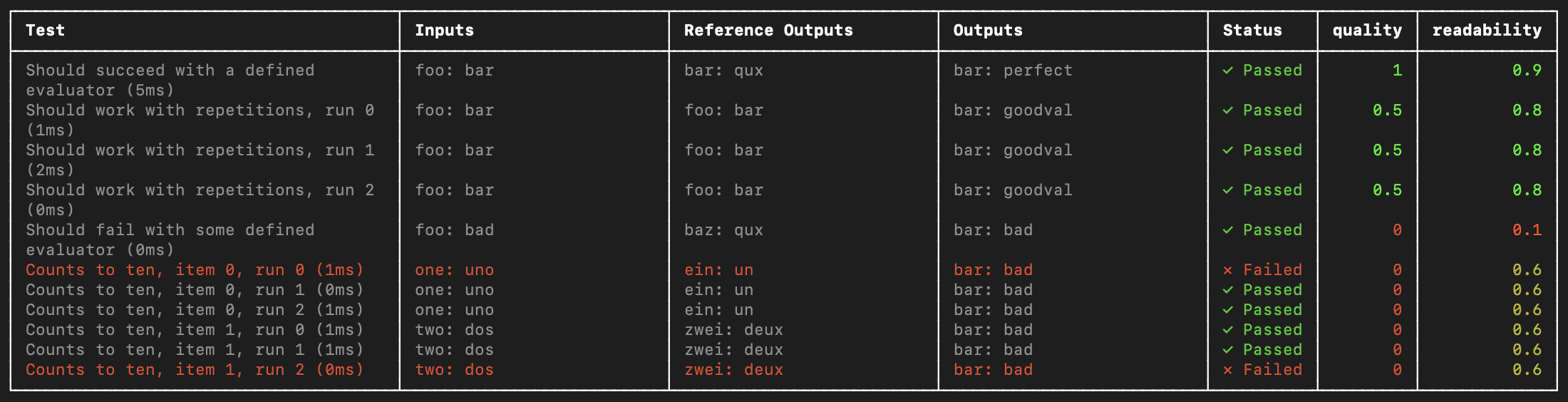
evaluate() evaluation flow, the Vitest or Jest testing frameworks are useful when:
- Each example requires different evaluation logic: Standard evaluation flows assume consistent application and evaluator execution across all dataset examples. For more complex systems or comprehensive evaluations, specific system subsets may require evaluation with particular input types and metrics. These heterogeneous evaluations are simpler to write as distinct test case suites that track together.
- You want to assert binary expectations: Track assertions in LangSmith and raise assertion errors locally (e.g. in CI pipelines). Testing tools help when both evaluating system outputs and asserting basic properties about them.
- You want to take advantage of mocks, watch mode, local results, or other features of the Vitest/Jest ecosystems.
Requires JS/TS SDK version
langsmith>=0.3.1.The Python SDK has an analogous pytest integration.
Setup
Set up the integrations as follows. Note that while you can add LangSmith evals alongside your other unit tests (as standard*.test.ts files) using your existing test config files, the below examples will also set up a separate test config file and command to run your evals. It will assume you end your test files with .eval.ts.
This ensures that the custom test reporter and other LangSmith touchpoints do not modify your existing test outputs.
Vitest
Install the required development dependencies if you have not already:openai (and langsmith) as a dependency:
ls.vitest.config.ts file with the following base config:
includeensures that only files ending with some variation ofeval.tsin your project are runreportersis responsible for nicely formatting your output as shown abovesetupFilesrunsdotenvto load environment variables before running your evalstestTimeoutsets a global default timeout for each test. Because LLM calls can be slow, we increase this from the Vitest default
scripts field in your package.json to run Vitest with the config you just created:
Jest
Install the required development dependencies if you have not already:openai (and langsmith) as a dependency:
The following setup instructions are for basic JS files and CJS. To add support for TypeScript and ESM, see Jest’s official docs or use Vitest.
ls.jest.config.cjs:
testMatchensures that only files ending with some variation ofeval.jsin your project are runreportersis responsible for nicely formatting your output as shown abovesetupFilesrunsdotenvto load environment variables before running your evalstestTimeoutsets a global default timeout for each test. Because LLM calls can be slow, we increase this from the Jest default
scripts field in your package.json to run Jest with the config you just created:
Define and run evals
You can now define evals as tests using familiar Vitest/Jest syntax, with a few caveats:- You should import
describeandtestfrom thelangsmith/jestorlangsmith/vitestentrypoint. - You must wrap your test cases in a
describeblock. - When declaring tests, the signature is slightly different—there is an extra argument containing example inputs and expected outputs.
sql.eval.ts (or sql.eval.js if you are using Jest without TypeScript) and pasting this code into it:
ls.describe() as defining a LangSmith dataset. If you have LangSmith tracing environment variables set when you run the test suite, the SDK does the following:
- Creates a dataset with the same name as the name passed to
ls.describe()in LangSmith if it does not exist. - Creates an example in the dataset for each input and expected output passed into a test case if a matching one does not already exist.
- Creates a new experiment with one result for each test case.
- Collects the pass/fail rate under the
passfeedback key for each test case.
pass boolean feedback key based on the test case passing / failing. It will also track any outputs that you log with ls.logOutputs() or return from the test function as “actual” result values from your app for the experiment.
Create a .env file with your OPENAI_API_KEY and LangSmith credentials if you don’t already have one:
eval script we set up in the previous step to run the test:
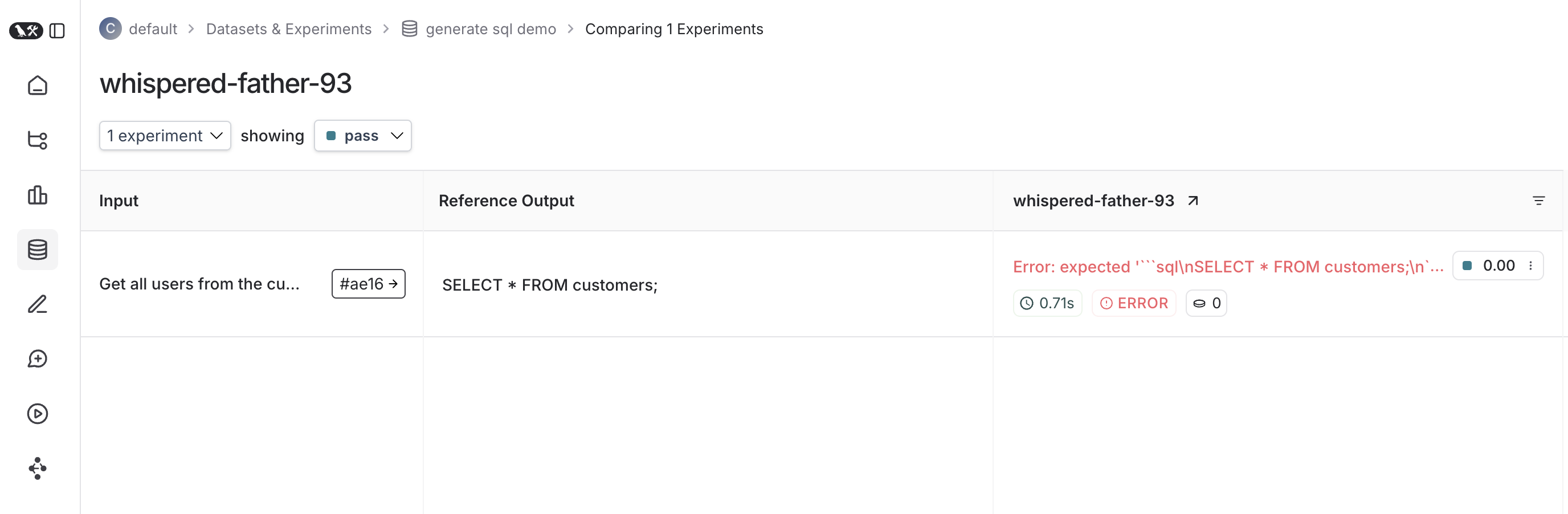
Trace feedback
By default LangSmith collects the pass/fail rate under thepass feedback key for each test case. You can add additional feedback with either ls.logFeedback() or ls.wrapEvaluator(). To do so, try the following as your sql.eval.ts file (or sql.eval.js if you are using Jest without TypeScript):
ls.wrapEvaluator() around the myEvaluator function. This makes it so that the LLM-as-judge call is traced separately from the rest of the test case to avoid clutter, and conveniently creates feedback if the return value from the wrapped function matches { key: string; score: number | boolean }. In this case, instead of showing up in the main test case run, the evaluator trace will instead show up in a trace associated with the correctness feedback key.
You can see the evaluator runs in LangSmith by clicking their corresponding feedback chips in the UI.
Running multiple examples against a test case
You can run the same test case over multiple examples and parameterize your tests usingls.test.each(). This is useful when you want to evaluate your app the same way against different inputs:
Use an existing dataset (Vitest only)
Instead of defining examples inline, you can run tests against an existing dataset in LangSmith:- Use
client.listExamples()to fetch examples from a dataset that already exists in LangSmith. - Collect the examples into an array (e.g.,
testExamples) by iterating through the async generator. - Pass the array to
ls.test.each()to run your test logic against each example from the dataset.
Log outputs
Every time we run a test we’re syncing it to a dataset example and tracing it as a run. To trace final outputs for the run, you can usels.logOutputs() like this:
Trace intermediate calls
LangSmith will automatically trace any traceable intermediate calls that happen in the course of test case execution.Focusing or skipping tests
You can chain the Vitest/Jest.skip and .only methods on ls.test() and ls.describe():
Configuring test suites
You can configure test suites with values like metadata or a custom client by passing an extra argument tols.describe() for the full suite or by passing a config field into ls.test() for individual tests:
process.env.ENVIRONMENT, process.env.NODE_ENV and process.env.LANGSMITH_ENVIRONMENT and set them as metadata on created experiments. You can then filter experiments by metadata in LangSmith’s UI.
See the API refs for a full list of configuration options.
Dry-run mode
If you want to run the tests without syncing the results to LangSmith, you can set omit your LangSmith tracing environment variables or setLANGSMITH_TEST_TRACKING=false in your environment.
The tests will run as normal, but the experiment logs will not be sent to LangSmith.
Connect these docs to your agent of choice via MCP for real-time answers.