

This guide explains the mechanics of using subgraphs. A subgraph is a graph that is used as a node in another graph. Subgraphs are useful for:
  • Building multi-agent systems
  • Re-using a set of nodes in multiple graphs
  • Distributing development: when you want different teams to work on different parts of the graph independently, you can define each part as a subgraph, and as long as the subgraph interface (the input and output schemas) is respected, the parent graph can be built without knowing any details of the subgraph

Setup

pip install -U langgraph
Set up LangSmith for LangGraph development Sign up for LangSmith to quickly spot issues and improve the performance of your LangGraph projects. LangSmith lets you use trace data to debug, test, and monitor your LLM apps built with LangGraph — read more about how to get started here.

Define subgraph communication

When adding subgraphs, you need to define how the parent graph and the subgraph communicate:
PatternWhen to useState schemas
Call a subgraph inside a nodeParent and subgraph have different state schemas (no shared keys), or you need to transform state between themYou write a wrapper function that maps parent state to subgraph input and subgraph output back to parent state
Add a subgraph as a nodeParent and subgraph share state keys — the subgraph reads from and writes to the same channels as the parentYou pass the compiled subgraph directly to add_node — no wrapper function needed

Call a subgraph inside a node

When the parent graph and subgraph have different state schemas (no shared keys), invoke the subgraph inside a node function. This is common when you want to keep a private message history for each agent in a multi-agent system. The node function transforms the parent state to the subgraph state before invoking the subgraph, and transforms the results back to the parent state before returning.
from typing_extensions import TypedDict
from langgraph.graph.state import StateGraph, START

class SubgraphState(TypedDict):
    bar: str

# Subgraph

def subgraph_node_1(state: SubgraphState):
    return {"bar": "hi! " + state["bar"]}

subgraph_builder = StateGraph(SubgraphState)
subgraph_builder.add_node(subgraph_node_1)
subgraph_builder.add_edge(START, "subgraph_node_1")
subgraph = subgraph_builder.compile()

# Parent graph

class State(TypedDict):
    foo: str

def call_subgraph(state: State):
    # Transform the state to the subgraph state
    subgraph_output = subgraph.invoke({"bar": state["foo"]})  
    # Transform response back to the parent state
    return {"foo": subgraph_output["bar"]}

builder = StateGraph(State)
builder.add_node("node_1", call_subgraph)
builder.add_edge(START, "node_1")
graph = builder.compile()
from typing_extensions import TypedDict
from langgraph.graph.state import StateGraph, START

# Define subgraph
class SubgraphState(TypedDict):
    # note that none of these keys are shared with the parent graph state
    bar: str
    baz: str

def subgraph_node_1(state: SubgraphState):
    return {"baz": "baz"}

def subgraph_node_2(state: SubgraphState):
    return {"bar": state["bar"] + state["baz"]}

subgraph_builder = StateGraph(SubgraphState)
subgraph_builder.add_node(subgraph_node_1)
subgraph_builder.add_node(subgraph_node_2)
subgraph_builder.add_edge(START, "subgraph_node_1")
subgraph_builder.add_edge("subgraph_node_1", "subgraph_node_2")
subgraph = subgraph_builder.compile()

# Define parent graph
class ParentState(TypedDict):
    foo: str

def node_1(state: ParentState):
    return {"foo": "hi! " + state["foo"]}

def node_2(state: ParentState):
    # Transform the state to the subgraph state
    response = subgraph.invoke({"bar": state["foo"]})
    # Transform response back to the parent state
    return {"foo": response["bar"]}


builder = StateGraph(ParentState)
builder.add_node("node_1", node_1)
builder.add_node("node_2", node_2)
builder.add_edge(START, "node_1")
builder.add_edge("node_1", "node_2")
graph = builder.compile()

for chunk in graph.stream({"foo": "foo"}, subgraphs=True):
    print(chunk)
((), {'node_1': {'foo': 'hi! foo'}})
(('node_2:577b710b-64ae-31fb-9455-6a4d4cc2b0b9',), {'subgraph_node_1': {'baz': 'baz'}})
(('node_2:577b710b-64ae-31fb-9455-6a4d4cc2b0b9',), {'subgraph_node_2': {'bar': 'hi! foobaz'}})
((), {'node_2': {'foo': 'hi! foobaz'}})
This is an example with two levels of subgraphs: parent -> child -> grandchild.
# Grandchild graph
from typing_extensions import TypedDict
from langgraph.graph.state import StateGraph, START, END

class GrandChildState(TypedDict):
    my_grandchild_key: str

def grandchild_1(state: GrandChildState) -> GrandChildState:
    # NOTE: child or parent keys will not be accessible here
    return {"my_grandchild_key": state["my_grandchild_key"] + ", how are you"}


grandchild = StateGraph(GrandChildState)
grandchild.add_node("grandchild_1", grandchild_1)

grandchild.add_edge(START, "grandchild_1")
grandchild.add_edge("grandchild_1", END)

grandchild_graph = grandchild.compile()

# Child graph
class ChildState(TypedDict):
    my_child_key: str

def call_grandchild_graph(state: ChildState) -> ChildState:
    # NOTE: parent or grandchild keys won't be accessible here
    grandchild_graph_input = {"my_grandchild_key": state["my_child_key"]}
    grandchild_graph_output = grandchild_graph.invoke(grandchild_graph_input)
    return {"my_child_key": grandchild_graph_output["my_grandchild_key"] + " today?"}

child = StateGraph(ChildState)
# We're passing a function here instead of just compiled graph (`grandchild_graph`)
child.add_node("child_1", call_grandchild_graph)
child.add_edge(START, "child_1")
child.add_edge("child_1", END)
child_graph = child.compile()

# Parent graph
class ParentState(TypedDict):
    my_key: str

def parent_1(state: ParentState) -> ParentState:
    # NOTE: child or grandchild keys won't be accessible here
    return {"my_key": "hi " + state["my_key"]}

def parent_2(state: ParentState) -> ParentState:
    return {"my_key": state["my_key"] + " bye!"}

def call_child_graph(state: ParentState) -> ParentState:
    child_graph_input = {"my_child_key": state["my_key"]}
    child_graph_output = child_graph.invoke(child_graph_input)
    return {"my_key": child_graph_output["my_child_key"]}

parent = StateGraph(ParentState)
parent.add_node("parent_1", parent_1)
# We're passing a function here instead of just a compiled graph (`child_graph`)
parent.add_node("child", call_child_graph)
parent.add_node("parent_2", parent_2)

parent.add_edge(START, "parent_1")
parent.add_edge("parent_1", "child")
parent.add_edge("child", "parent_2")
parent.add_edge("parent_2", END)

parent_graph = parent.compile()

for chunk in parent_graph.stream({"my_key": "Bob"}, subgraphs=True):
    print(chunk)
((), {'parent_1': {'my_key': 'hi Bob'}})
(('child:2e26e9ce-602f-862c-aa66-1ea5a4655e3b', 'child_1:781bb3b1-3971-84ce-810b-acf819a03f9c'), {'grandchild_1': {'my_grandchild_key': 'hi Bob, how are you'}})
(('child:2e26e9ce-602f-862c-aa66-1ea5a4655e3b',), {'child_1': {'my_child_key': 'hi Bob, how are you today?'}})
((), {'child': {'my_key': 'hi Bob, how are you today?'}})
((), {'parent_2': {'my_key': 'hi Bob, how are you today? bye!'}})

Add a subgraph as a node

When the parent graph and subgraph share state keys, you can pass a compiled subgraph directly to add_node. No wrapper function is needed — the subgraph reads from and writes to the parent’s state channels automatically. For example, in multi-agent systems, the agents often communicate over a shared messages key. SQL agent graph If your subgraph shares state keys with the parent graph, you can follow these steps to add it to your graph:
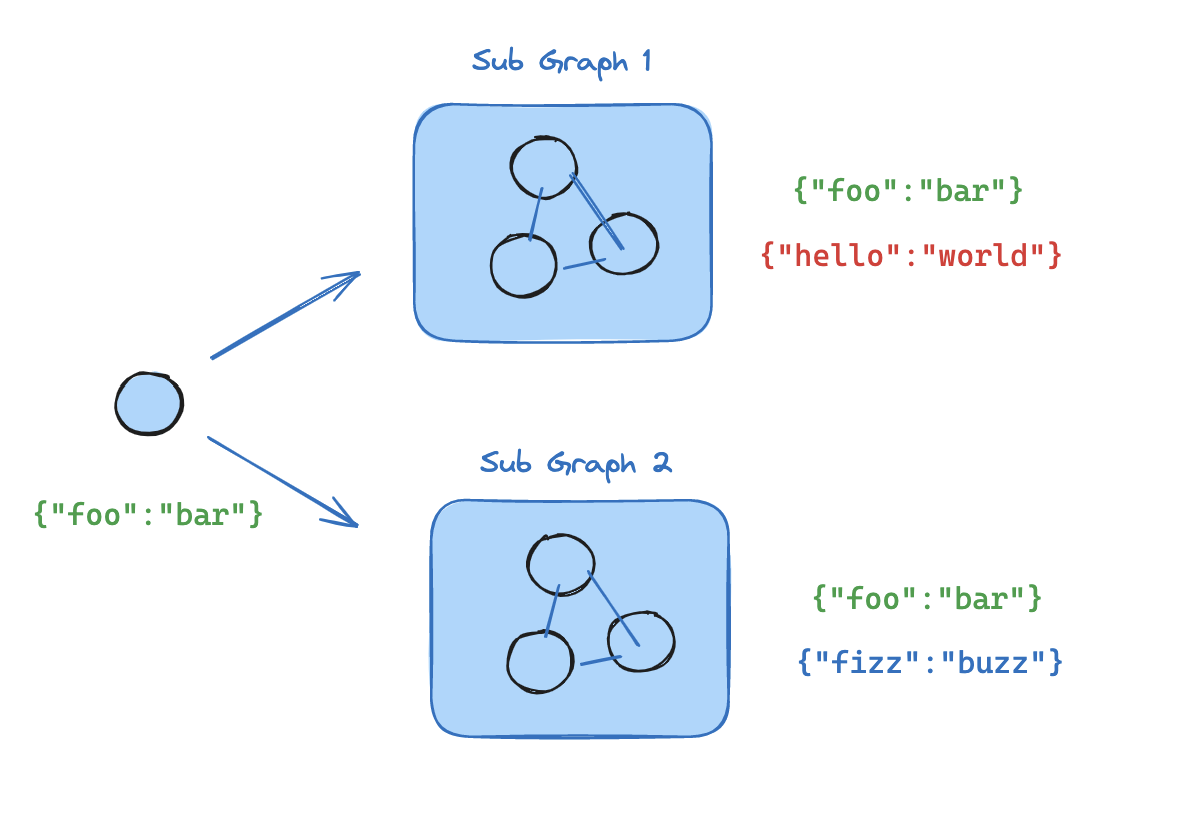
  1. Define the subgraph workflow (subgraph_builder in the example below) and compile it
  2. Pass compiled subgraph to the add_node method when defining the parent graph workflow
from typing_extensions import TypedDict
from langgraph.graph.state import StateGraph, START

class State(TypedDict):
    foo: str

# Subgraph

def subgraph_node_1(state: State):
    return {"foo": "hi! " + state["foo"]}

subgraph_builder = StateGraph(State)
subgraph_builder.add_node(subgraph_node_1)
subgraph_builder.add_edge(START, "subgraph_node_1")
subgraph = subgraph_builder.compile()

# Parent graph

builder = StateGraph(State)
builder.add_node("node_1", subgraph)  
builder.add_edge(START, "node_1")
graph = builder.compile()
from typing_extensions import TypedDict
from langgraph.graph.state import StateGraph, START

# Define subgraph
class SubgraphState(TypedDict):
    foo: str  # shared with parent graph state
    bar: str  # private to SubgraphState

def subgraph_node_1(state: SubgraphState):
    return {"bar": "bar"}

def subgraph_node_2(state: SubgraphState):
    # note that this node is using a state key ('bar') that is only available in the subgraph
    # and is sending update on the shared state key ('foo')
    return {"foo": state["foo"] + state["bar"]}

subgraph_builder = StateGraph(SubgraphState)
subgraph_builder.add_node(subgraph_node_1)
subgraph_builder.add_node(subgraph_node_2)
subgraph_builder.add_edge(START, "subgraph_node_1")
subgraph_builder.add_edge("subgraph_node_1", "subgraph_node_2")
subgraph = subgraph_builder.compile()

# Define parent graph
class ParentState(TypedDict):
    foo: str

def node_1(state: ParentState):
    return {"foo": "hi! " + state["foo"]}

builder = StateGraph(ParentState)
builder.add_node("node_1", node_1)
builder.add_node("node_2", subgraph)
builder.add_edge(START, "node_1")
builder.add_edge("node_1", "node_2")
graph = builder.compile()

for chunk in graph.stream({"foo": "foo"}):
    print(chunk)
{'node_1': {'foo': 'hi! foo'}}
{'node_2': {'foo': 'hi! foobar'}}

Subgraph persistence

When you use a subgraph, you need to decide what happens to its internal data between calls. Consider a customer support bot that delegates to specialist subagents: should the “billing expert” subagent remember the customer’s earlier questions, or start fresh each time it’s called? By default, subgraphs are stateless (no memory): each call starts with a blank slate. This is the right choice for most applications, including multi-agent systems where subagents handle independent requests. If a subagent needs multi-turn conversation memory (for example, a research assistant that builds context over several exchanges) you can make it stateful (persistent memory) so its conversation history and data accumulate across calls on the same thread.
The parent graph must be compiled with a checkpointer for subgraph persistence features (interrupts, state inspection, stateful memory) to work. See persistence.
The examples below use LangChain’s create_agent, which is a common way to build agents. create_agent produces a LangGraph graph under the hood, so all subgraph persistence concepts apply directly. If you’re building with raw LangGraph StateGraph, the same patterns and configuration options apply — see the Graph API for details.

Stateless

Use stateless subgraphs when each call to the subgraph is independent and the subagent doesn’t need to remember anything from previous calls. This is the most common pattern, especially for multi-agent systems where subagents handle one-off requests like “look up this customer’s order” or “summarize this document.” There are two stateless options depending on whether you need interrupts (human-in-the-loop pausing) and durable execution within the subgraph.

With interrupts

This is the recommended mode for most applications, including multi-agent systems where subagents are invoked as tools. It supports interrupts, durable execution, and parallel calls while keeping each invocation isolated.
Use this when you want a subagent with no memory across calls, but you still need durable execution and the ability to pause mid-run for user input (for example, asking for approval before taking an action). This is the default behavior: omit checkpointer or set it to None. Each call starts fresh, but within a single call, the subgraph can use interrupt() to pause and resume. The following examples use two subagents (fruit expert, veggie expert) wrapped as tools for an outer agent:
from langchain.agents import create_agent
from langchain.tools import tool
from langgraph.checkpoint.memory import MemorySaver
from langgraph.types import Command, interrupt

@tool
def fruit_info(fruit_name: str) -> str:
    """Look up fruit info."""
    return f"Info about {fruit_name}"

@tool
def veggie_info(veggie_name: str) -> str:
    """Look up veggie info."""
    return f"Info about {veggie_name}"

# Subagents — no checkpointer setting (inherits parent)
fruit_agent = create_agent(
    model="gpt-4.1-mini",
    tools=[fruit_info],
    prompt="You are a fruit expert. Use the fruit_info tool. Respond in one sentence.",
)

veggie_agent = create_agent(
    model="gpt-4.1-mini",
    tools=[veggie_info],
    prompt="You are a veggie expert. Use the veggie_info tool. Respond in one sentence.",
)

# Wrap subagents as tools for the outer agent
@tool
def ask_fruit_expert(question: str) -> str:
    """Ask the fruit expert. Use for ALL fruit questions."""
    response = fruit_agent.invoke(
        {"messages": [{"role": "user", "content": question}]},
    )
    return response["messages"][-1].content

@tool
def ask_veggie_expert(question: str) -> str:
    """Ask the veggie expert. Use for ALL veggie questions."""
    response = veggie_agent.invoke(
        {"messages": [{"role": "user", "content": question}]},
    )
    return response["messages"][-1].content

# Outer agent with checkpointer
agent = create_agent(
    model="gpt-4.1-mini",
    tools=[ask_fruit_expert, ask_veggie_expert],
    prompt=(
        "You have two experts: ask_fruit_expert and ask_veggie_expert. "
        "ALWAYS delegate questions to the appropriate expert."
    ),
    checkpointer=MemorySaver(),
)
Each invocation can use interrupt() to pause and resume. Add interrupt() to a tool function to require user approval before proceeding:
@tool
def fruit_info(fruit_name: str) -> str:
    """Look up fruit info."""
    interrupt("continue?")  
    return f"Info about {fruit_name}"
config = {"configurable": {"thread_id": "1"}}

# Invoke — the subagent's tool calls interrupt()
response = agent.invoke(
    {"messages": [{"role": "user", "content": "Tell me about apples"}]},
    config=config,
)
# response contains __interrupt__

# Resume — approve the interrupt
response = agent.invoke(Command(resume=True), config=config)  
# Subagent message count: 4

Without interrupts

Use this when you want to run a subagent like a normal function call with no checkpointing overhead. The subgraph cannot pause/resume and does not benefit from durable execution. Compile with checkpointer=False.
Without checkpointing, the subgraph has no durable execution. If the process crashes mid-run, the subgraph cannot recover and must be re-run from the beginning.
subgraph_builder = StateGraph(...)
subgraph = subgraph_builder.compile(checkpointer=False)  

Stateful

Use stateful subgraphs when a subagent needs to remember previous interactions. For example, a research assistant that builds up context over several exchanges, or a coding assistant that tracks what files it has already edited. With stateful persistence, the subagent’s conversation history and data accumulate across calls on the same thread. Each call picks up where the last one left off. Compile with checkpointer=True to enable this behavior.
Stateful subgraphs do not support parallel tool calls. When an LLM has access to a stateful subagent as a tool, it may try to call that tool multiple times in parallel (for example, asking the fruit expert about apples and bananas simultaneously). This causes checkpoint conflicts because both calls write to the same namespace.The examples below use LangChain’s ToolCallLimitMiddleware to prevent this. If you’re building with pure LangGraph StateGraph, you need to prevent parallel tool calls yourself — for example, by configuring your model to disable parallel tool calling or by adding logic to ensure the same subgraph is not invoked multiple times in parallel.
The following examples use a fruit expert subagent compiled with checkpointer=True:
from langchain.agents import create_agent
from langchain.agents.middleware import ToolCallLimitMiddleware
from langchain.tools import tool
from langgraph.checkpoint.memory import MemorySaver
from langgraph.types import Command, interrupt

@tool
def fruit_info(fruit_name: str) -> str:
    """Look up fruit info."""
    return f"Info about {fruit_name}"

# Subagent with checkpointer=True for persistent state
fruit_agent = create_agent(
    model="gpt-4.1-mini",
    tools=[fruit_info],
    prompt="You are a fruit expert. Use the fruit_info tool. Respond in one sentence.",
    checkpointer=True,  
)

# Wrap subagent as a tool for the outer agent
@tool
def ask_fruit_expert(question: str) -> str:
    """Ask the fruit expert. Use for ALL fruit questions."""
    response = fruit_agent.invoke(
        {"messages": [{"role": "user", "content": question}]},
    )
    return response["messages"][-1].content

# Outer agent with checkpointer
# Use ToolCallLimitMiddleware to prevent parallel calls to stateful subagents,
# which would cause checkpoint conflicts.
agent = create_agent(
    model="gpt-4.1-mini",
    tools=[ask_fruit_expert],
    prompt="You have a fruit expert. ALWAYS delegate fruit questions to ask_fruit_expert.",
    middleware=[  
        ToolCallLimitMiddleware(tool_name="ask_fruit_expert", run_limit=1),  
    ],  
    checkpointer=MemorySaver(),
)
Stateful subagents support interrupt() just like per-invocation. Add interrupt() to a tool function to require user approval:
@tool
def fruit_info(fruit_name: str) -> str:
    """Look up fruit info."""
    interrupt("continue?")  
    return f"Info about {fruit_name}"
config = {"configurable": {"thread_id": "1"}}

# Invoke — the subagent's tool calls interrupt()
response = agent.invoke(
    {"messages": [{"role": "user", "content": "Tell me about apples"}]},
    config=config,
)
# response contains __interrupt__

# Resume — approve the interrupt
response = agent.invoke(Command(resume=True), config=config)  
# Subagent message count: 4

Checkpointer reference

Control subgraph persistence with the checkpointer parameter on .compile():
subgraph = builder.compile(checkpointer=False)  # or True / None
FeatureWithout interruptsWith interrupts (default)Stateful
checkpointer=FalseNoneTrue
Interrupts (HITL)
Multi-turn memory
Multiple calls (different subgraphs)
Multiple calls (same subgraph)
State inspection
  • Interrupts (HITL): The subgraph can use interrupt() to pause execution and wait for user input, then resume where it left off.
  • Multi-turn memory: The subgraph retains its state across multiple invocations within the same thread. Each call picks up where the last one left off rather than starting fresh.
  • Multiple calls (different subgraphs): Multiple different subgraph instances can be invoked within a single node without checkpoint namespace conflicts.
  • Multiple calls (same subgraph): The same subgraph instance can be invoked multiple times within a single node. With stateful persistence, these calls write to the same checkpoint namespace and conflict — use per-invocation persistence instead.
  • State inspection: The subgraph’s state is available via get_state(config, subgraphs=True) for debugging and monitoring.

View subgraph state

When you enable persistence, you can inspect the subgraph state using the subgraphs option. With checkpointer=False, no subgraph checkpoints are saved, so subgraph state is not available.
Viewing subgraph state requires that LangGraph can statically discover the subgraph — i.e., it is added as a node or called inside a node. It does not work when a subgraph is called inside a tool function or other indirection (e.g., the subagents pattern). Interrupts still propagate to the top-level graph regardless of nesting.
Returns subgraph state for the current invocation only. Each invocation starts fresh.
from langgraph.graph import START, StateGraph
from langgraph.checkpoint.memory import MemorySaver
from langgraph.types import interrupt, Command
from typing_extensions import TypedDict

class State(TypedDict):
    foo: str

# Subgraph
def subgraph_node_1(state: State):
    value = interrupt("Provide value:")
    return {"foo": state["foo"] + value}

subgraph_builder = StateGraph(State)
subgraph_builder.add_node(subgraph_node_1)
subgraph_builder.add_edge(START, "subgraph_node_1")
subgraph = subgraph_builder.compile()  # inherits parent checkpointer

# Parent graph
builder = StateGraph(State)
builder.add_node("node_1", subgraph)
builder.add_edge(START, "node_1")

checkpointer = MemorySaver()
graph = builder.compile(checkpointer=checkpointer)

config = {"configurable": {"thread_id": "1"}}

graph.invoke({"foo": ""}, config)

# View subgraph state for the current invocation
subgraph_state = graph.get_state(config, subgraphs=True).tasks[0].state  

# Resume the subgraph
graph.invoke(Command(resume="bar"), config)

Stream subgraph outputs

To include outputs from subgraphs in the streamed outputs, you can set the subgraphs option in the stream method of the parent graph. This will stream outputs from both the parent graph and any subgraphs.
for chunk in graph.stream(
    {"foo": "foo"},
    subgraphs=True, 
    stream_mode="updates",
):
    print(chunk)
from typing_extensions import TypedDict
from langgraph.graph.state import StateGraph, START

# Define subgraph
class SubgraphState(TypedDict):
    foo: str
    bar: str

def subgraph_node_1(state: SubgraphState):
    return {"bar": "bar"}

def subgraph_node_2(state: SubgraphState):
    # note that this node is using a state key ('bar') that is only available in the subgraph
    # and is sending update on the shared state key ('foo')
    return {"foo": state["foo"] + state["bar"]}

subgraph_builder = StateGraph(SubgraphState)
subgraph_builder.add_node(subgraph_node_1)
subgraph_builder.add_node(subgraph_node_2)
subgraph_builder.add_edge(START, "subgraph_node_1")
subgraph_builder.add_edge("subgraph_node_1", "subgraph_node_2")
subgraph = subgraph_builder.compile()

# Define parent graph
class ParentState(TypedDict):
    foo: str

def node_1(state: ParentState):
    return {"foo": "hi! " + state["foo"]}

builder = StateGraph(ParentState)
builder.add_node("node_1", node_1)
builder.add_node("node_2", subgraph)
builder.add_edge(START, "node_1")
builder.add_edge("node_1", "node_2")
graph = builder.compile()

for chunk in graph.stream(
    {"foo": "foo"},
    stream_mode="updates",
    subgraphs=True, 
):
    print(chunk)
((), {'node_1': {'foo': 'hi! foo'}})
(('node_2:e58e5673-a661-ebb0-70d4-e298a7fc28b7',), {'subgraph_node_1': {'bar': 'bar'}})
(('node_2:e58e5673-a661-ebb0-70d4-e298a7fc28b7',), {'subgraph_node_2': {'foo': 'hi! foobar'}})
((), {'node_2': {'foo': 'hi! foobar'}})

Connect these docs to Claude, VSCode, and more via MCP for real-time answers.