

- Fully managed infrastructure: LangChain handles all infrastructure, updates, scaling, and maintenance.
- LangSmith UI: Full access to observability, evaluation, agent deployment management, and Studio.
- Deploy Agent Servers from GitHub: Connect your repositories and deploy Agent Servers to the Cloud with a few clicks.
- Automated CI/CD for Agent Servers: The build and deployment process for your Agent Servers is handled automatically by the platform.
If you’re ready to deploy your app to LangSmith Cloud (AWS or GCP), follow the Cloud deployment quickstart or the full setup guide. This page explains the Cloud managed architecture for reference.
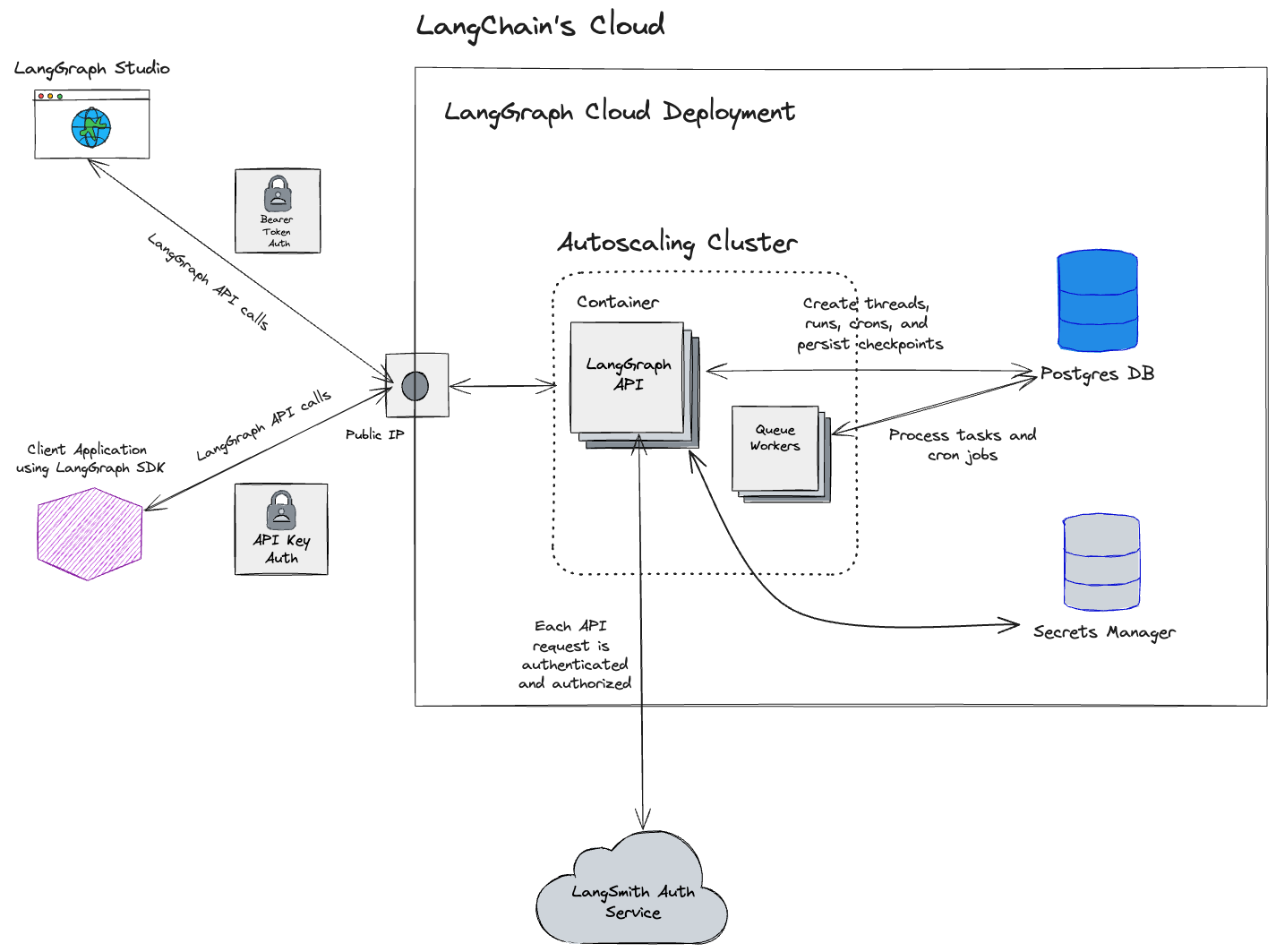
Cloud architecture and scalability
This section is only relevant for cloud-managed LangSmith at https://smith.langchain.com, https://eu.smith.langchain.com, https://apac.smith.langchain.com, and https://aws.smith.langchain.com.For information on the Self-hosted LangSmith solution, refer to the Self-hosted documentation.
us-central1 (Iowa) region of GCP.
The EU-based LangSmith service is available and hosted in the
europe-west4 (Netherlands) region of GCP. If you are interested in an Enterprise plan in this region, contact our sales team.As of April 2026, LangSmith SaaS is available on AWS in
us-east-2 (Ohio).As of May 2026, LangSmith SaaS is available in APAC on GCP in
australia-southeast1 (Sydney).Regional storage
The resources and services in this table are stored in the location corresponding to the URL where sign-up occurred (GCP US, GCP EU, GCP APAC, or AWS US). Cloud-managed LangSmith uses Supabase for authentication/authorization and ClickHouse Cloud for the data warehouse.
See the Regions FAQ for more information.
Region-independent storage
Data listed here is stored exclusively in the US:- Payment and billing information with Stripe and Metronome
GCP services
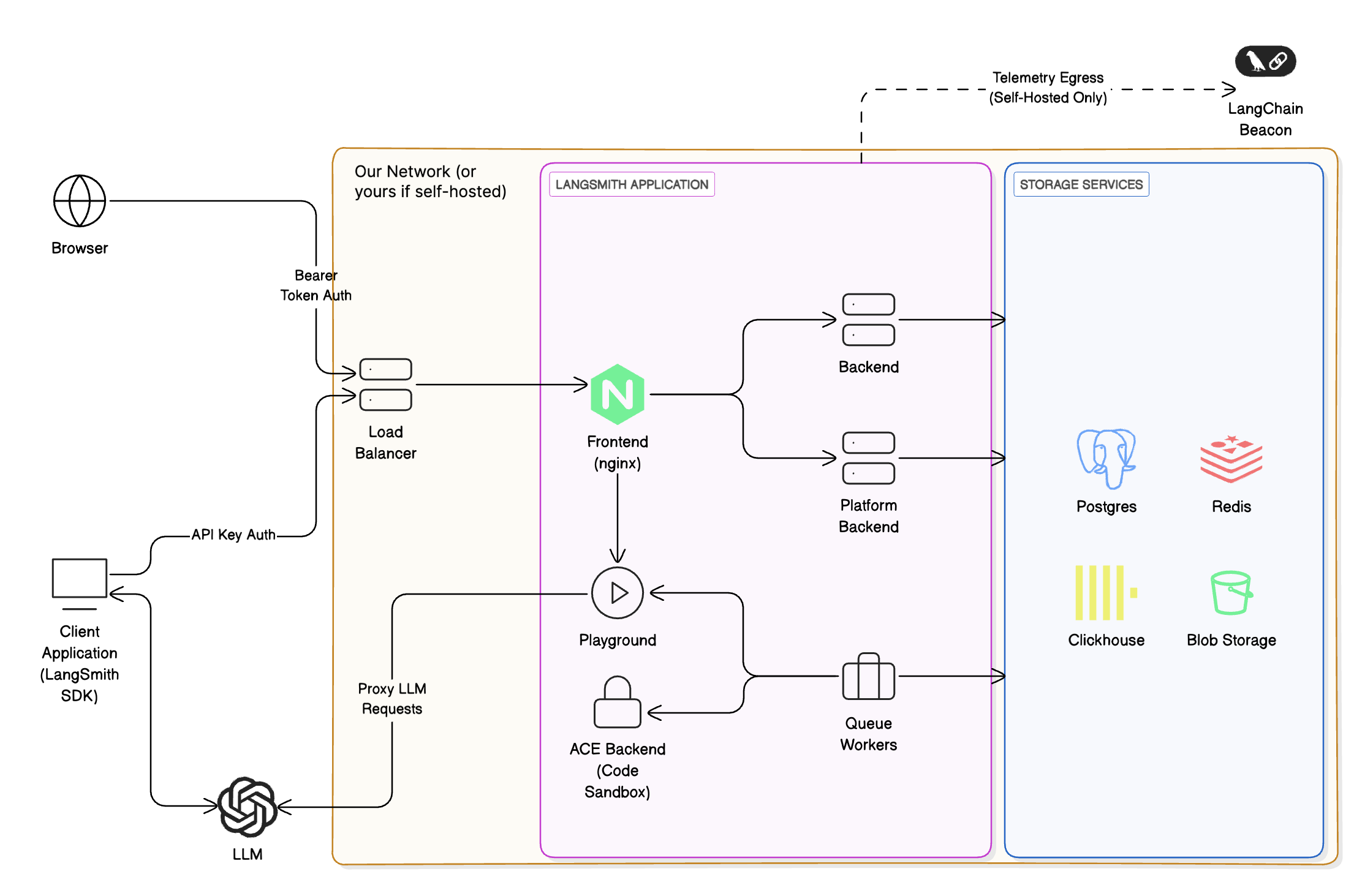
The following applies to the US, EU, and APAC SaaS regions on GCP. LangSmith is composed of the following services, all hosted on Google Kubernetes Engine (GKE):- LangSmith Frontend: serves the LangSmith UI.
- LangSmith Backend: serves the LangSmith API.
- LangSmith Platform Backend: handles authentication and other high-volume tasks. (Internal service)
- LangSmith Playground: handles forwarding requests to various LLM providers for the Playground feature.
- LangSmith Queue: handles processing of asynchronous tasks. (Internal service)
- Google Cloud Storage (GCS) for runs inputs and outputs.
- Google Cloud SQL PostgreSQL for transactional workloads.
- Google Cloud Memorystore for Redis for queuing and caching.
- Clickhouse Cloud on GCP for trace ingestion and analytics. Our services connect to Clickhouse Cloud, which is hosted in the same GCP region, via a private endpoint.
- Google Cloud Load Balancer for routing traffic to the LangSmith services.
- Google Cloud CDN for caching static assets.
- Google Cloud Armor for security and rate limits. For more information on rate limits we enforce, please refer to Rate limits.
AWS services
The following applies to the AWS US SaaS region inus-east-2 (Ohio). The same logical LangSmith components run on Amazon EKS instead of GKE.
LangSmith is composed of the following services, all hosted on Amazon EKS:
- LangSmith Frontend: serves the LangSmith UI.
- LangSmith Backend: serves the LangSmith API.
- LangSmith Platform Backend: handles authentication and other high-volume tasks. (Internal service)
- LangSmith Playground: handles forwarding requests to various LLM providers for the Playground feature.
- LangSmith Queue: handles processing of asynchronous tasks. (Internal service)
- Amazon S3 for runs inputs and outputs.
- Amazon RDS for PostgreSQL for transactional workloads.
- Amazon ElastiCache for Redis for queuing and caching.
- ClickHouse Cloud over AWS PrivateLink in
us-east-2for trace ingestion and analytics, consistent with the regional storage table above.
- Elastic Load Balancing (Network Load Balancers) and Istio ingress for routing traffic to the LangSmith services. Documented API rate limits are enforced at the Istio ingress gateway. For details, see Rate limits.
- Amazon CloudFront for caching static assets (including the web UI hostname
aws.smith.langchain.com). - AWS WAF on CloudFront for managed rule groups at the edge (for example, AWS Managed Rules common protections and Bot Control).
Allowlisting IP addresses
Egress from LangChain SaaS
Internet-bound traffic leaving LangSmith services is routed through a NAT gateway and originates from the following IP addresses. Vertex AI requests can use a different path, as described in Allow Vertex AI access.Agents on LangSmith Deployment egress from a separate IP list.
It may be helpful to allowlist these IP addresses if connecting to your own AzureOpenAI service or other endpoints that may be required by the Playground or Online Evaluation.
Allow Vertex AI access
For Vertex AI connections from LangSmith SaaS on GCP, public egress IP allowlisting alone might not satisfy VPC Service Controls. Private Google Access keeps Google API traffic within Google’s network instead of using the NAT gateway’s public IP addresses. See Google’s source IP access guidance. Configure a VPC Service Controls ingress rule for the source project corresponding to your LangSmith SaaS region:
These source projects are specifically for Vertex AI connections from the US, EU, and APAC GCP SaaS regions. Use the numeric
projects/PROJECT_NUMBER value in the ingress rule, not the project ID. Restrict the rule to the calling identity, your destination projects, and the required Vertex AI operations. The connection still requires the appropriate IAM permissions. See Google’s ingress rule configuration.
Select the source project by your LangSmith SaaS region, not the Vertex AI model’s region. Pod or node scaling does not change the source project number. Moving the source workload or VPC network to another project can change the required allowlist.
Ingress into LangChain SaaS
The LangChain endpoints map to the following static IP addresses for traffic that terminates on our GCP load balancers (US/EU/APAC) or, for AWS US, on the Network Load Balancer inus-east-2 (API and gateway hostnames):
You may need to allowlist these to enable traffic from your private network to LangSmith SaaS endpoints (
api.smith.langchain.com, smith.langchain.com, beacon.langchain.com, eu.api.smith.langchain.com, eu.smith.langchain.com, eu.beacon.langchain.com, apac.api.smith.langchain.com, apac.smith.langchain.com, apac.beacon.langchain.com, aws.api.smith.langchain.com, aws.smith.langchain.com).
Private connectivity (Enterprise)
Enterprise only. Private connectivity is available exclusively for Enterprise customers. Contact your account representative or sales@langchain.dev to enable this feature.
AWS PrivateLink
Customers on AWS can connect to LangSmith via AWS PrivateLink, providing private connectivity from any VPC. Cross-region connectivity is supported natively.Endpoint service name
Setup
1. Request access: Contact your account representative or sales@langchain.dev with your AWS account ID. LangChain will add your account to the endpoint service’s allowed principals list. 2. Create an Interface VPC Endpoint in your AWS account. Attach a security group that allows TCP 443 inbound from your VPC CIDR (or from the instances that need to reach LangSmith):pendingAcceptance to available. Allow a few minutes after acceptance for the change to fully propagate before testing connectivity.
Configure DNS
Configure DNS so thataws.api.smith.langchain.com resolves to your VPC endpoint’s private DNS name within your VPC. You can use any private DNS solution: Route 53 Private Hosted Zones, a corporate DNS resolver, or any DNS server reachable from your VPC.
First, get your endpoint’s DNS name:
aws.api.smith.langchain.com pointing to that DNS name. Here’s an example using Route 53:
Verify connectivity
From an EC2 instance or container in your VPC:GCP Private Service Connect
Enterprise customers on GCP can connect to LangSmith via Private Service Connect (PSC), providing private connectivity without exposing traffic to the public internet.Service attachment URIs
Use the following service attachment URIs to create a PSC endpoint in your VPC:PSC domains
After setup, use the following domains to connect to LangSmith over your PSC connection:Setup
Request access: Contact your account representative or sales@langchain.dev with your GCP project ID. LangChain will add your project to the service attachment’s allowed consumer list. After access is granted, create a PSC endpoint and configure DNS using either the gcloud CLI or Terraform.Create a PSC endpoint
Create a forwarding rule in your VPC targeting the service attachment:Configure DNS
Create a private DNS zone in your VPC and add an A record pointing to the PSC endpoint IP:Verify connectivity
From a VM in your VPC:API rate limits
LangSmith enforces rate limits on API endpoints to ensure service stability and fair usage. The following table shows the rate limits for different endpoints in the GCP US and GCP EU regions. GCP APAC and AWS US enforce comparable service-specific limits; contact support if you need exact limits for your organization. Note that:- Rate limits are expressed as
count / intervalwhere count is the number of requests allowed within the interval (in seconds). For example,2000 / 10means 2000 requests per 10 seconds. - When no HTTP method is specified in the endpoint column, the rate limit applies to all HTTP methods for that endpoint.
- When a specific method is listed (e.g.,
POST,GET), the rate limit applies only to that method.
Rate limit categories
- High throughput: General high-volume endpoints for core operations like authentication, metadata, and feedback.
- Repository: Repository and prompt management operations.
- Run ingest: Individual trace/run ingestion endpoints for observability.
- Charts: Chart generation and visualization endpoints.
- Multipart ingest: Bulk run ingestion via multipart upload for high-volume tracing.
- Run query (API): API key-based run query operations with stricter limits for complex queries.
- Run query (User): User-based run query operations with higher limits for interactive use.
- Generation: AI-powered code and content generation endpoints (limited to prevent abuse).
- Commits: Prompt versioning and commit operations.
- Deletion: Session deletion and workflow trigger operations.
- Run lookup: Retrieving specific runs by UUID.
- Examples: Fetching dataset examples for few-shot prompting.
- Default (API key): Fallback rate limit for authenticated API requests not matching specific patterns.
- Default (User): Fallback rate limit for authenticated user requests not matching specific patterns.
- Public download: High-volume public download endpoints for shared resources.
- Stats: Run statistics and analytics endpoints (region-specific limits apply).
- Public (catch-all): Default rate limit for unauthenticated public access.
Connect these docs to your agent of choice via MCP for real-time answers.