> ## Documentation Index
> Fetch the complete documentation index at: https://docs.langchain.com/llms.txt
> Use this file to discover all available pages before exploring further.
# Self-hosted LangSmith
**Important**
Self-hosted LangSmith is an add-on to the Enterprise plan designed for our largest, most security-conscious customers. For more details, refer to [Pricing](https://www.langchain.com/pricing). [Contact our sales team](https://www.langchain.com/contact-sales) if you want to get a license key to trial LangSmith in your environment.
Host an instance of LangSmith in your own infrastructure for [observability](/langsmith/observability), [evaluation](/langsmith/evaluation), and [prompt engineering](/langsmith/prompt-engineering). You can optionally enable [LangSmith Deployment](/langsmith/deploy-self-hosted-full-platform) to deploy and manage agents through the LangSmith UI.
**For step-by-step setup instructions for self-hosted LangSmith on AWS, GCP, or Azure**, refer to our cloud architecture guides: [AWS](/langsmith/aws-self-hosted), [GCP](/langsmith/gcp-self-hosted), or [Azure](/langsmith/azure-self-hosted).
Before installing or upgrading, review the [minimum versions for self-hosting dependencies](/langsmith/self-host-dependency-versions).
## What's included
A self-hosted LangSmith instance includes:
**Services:**
* LangSmith frontend UI
* LangSmith backend API
* LangSmith Platform backend
* LangSmith Playground
* LangSmith queue
* LangSmith ACE (Arbitrary Code Execution) backend
**Storage services:**
* ClickHouse (traces and feedback data)
* PostgreSQL (operational data)
* Redis (queuing and caching)
* Blob storage (optional, but recommended for production)
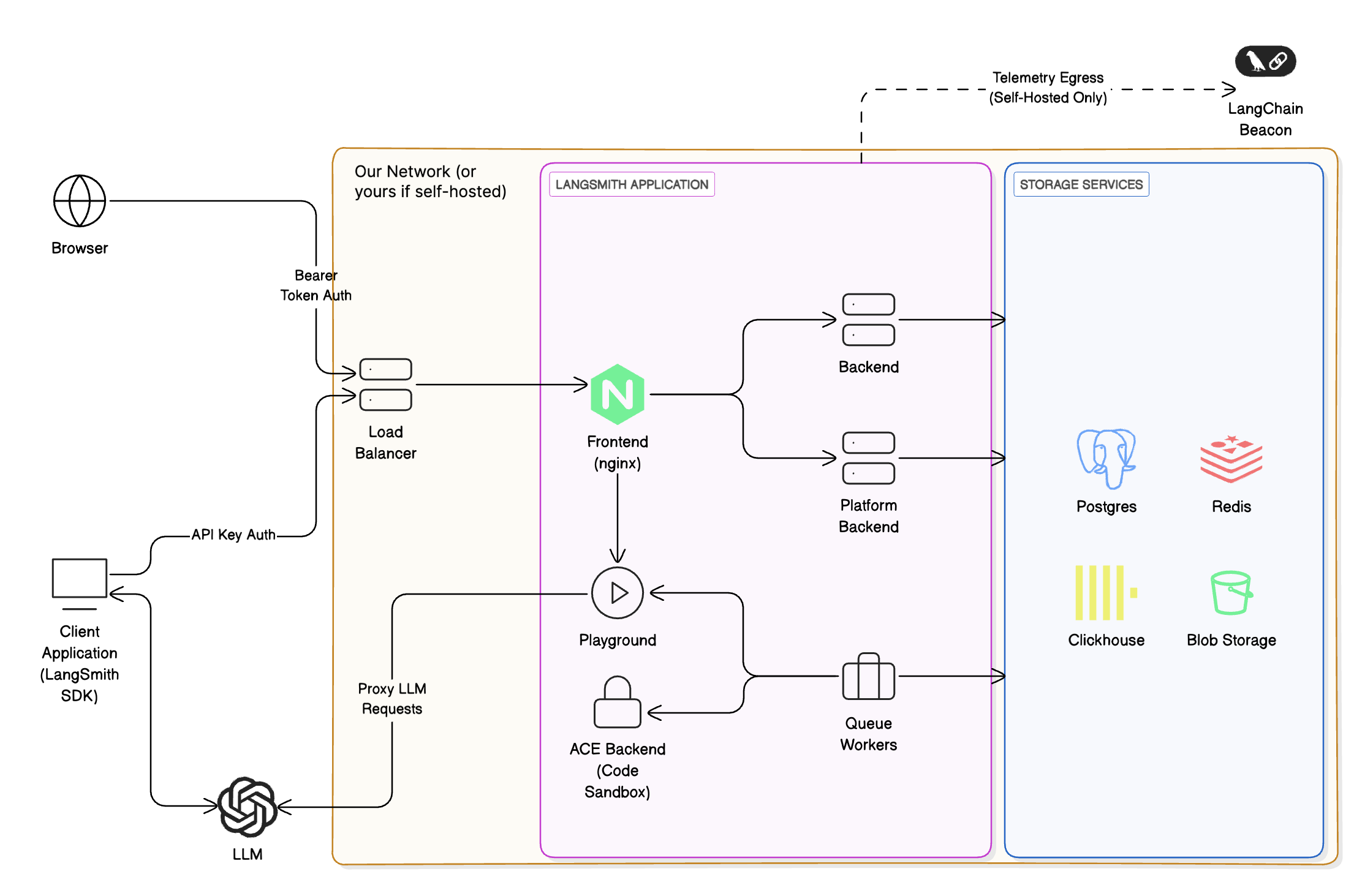
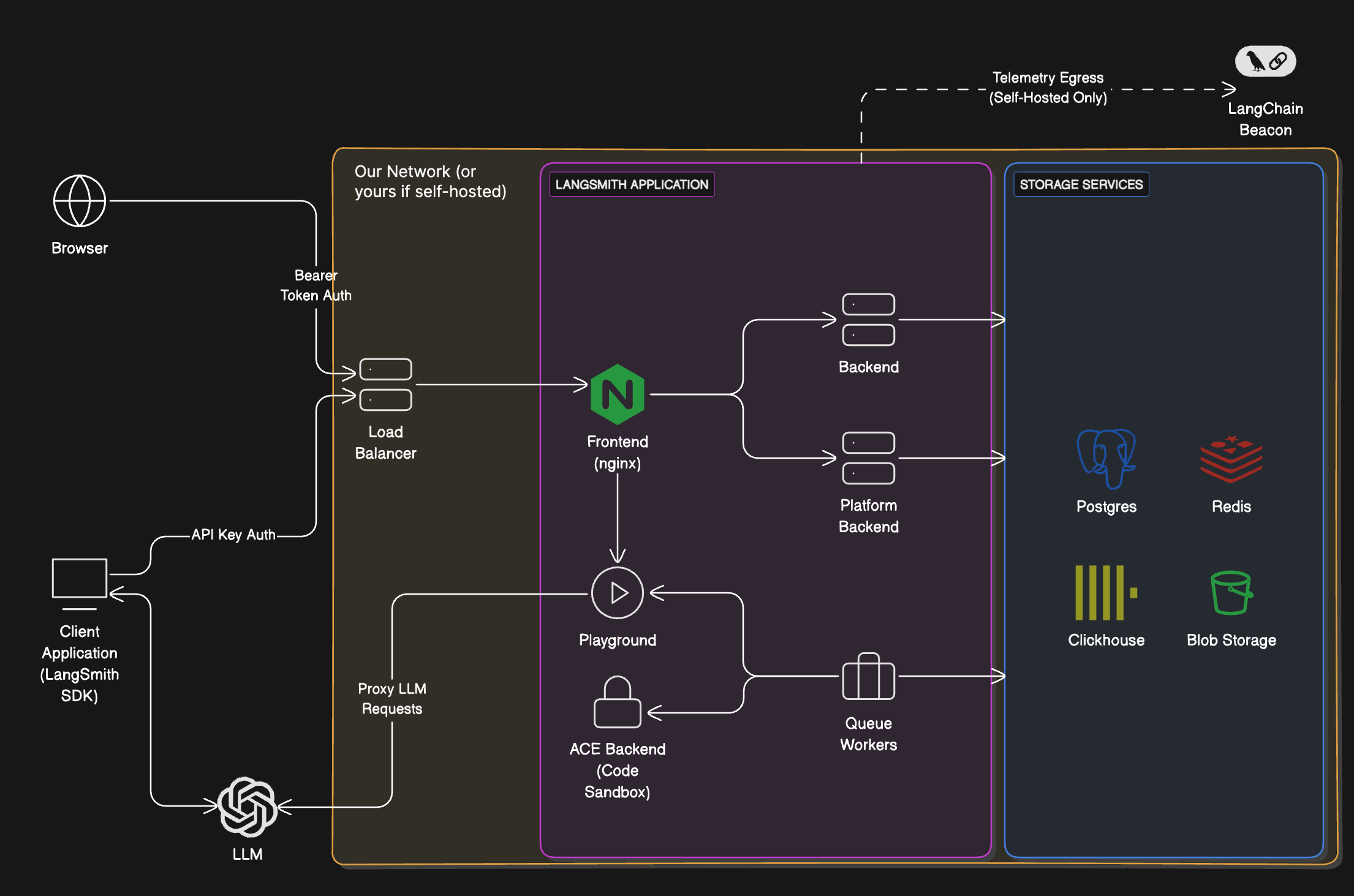 To access the LangSmith UI and send API requests, you will need to expose the [LangSmith frontend](#services) service. Depending on your installation method, this can be a load balancer or a port exposed on the host machine.
### Services
| Service | Description |
| -------------------------------------------------------------------------------------------------------------- | -------------------------------------------------------------------------------------------------------------------------------------------------------------------------------------------------------------------------------------------------------------------------------------------------------------------------------------------------------- |
| **LangSmith frontend** | The frontend uses Nginx to serve the LangSmith UI and route API requests to the other servers. This serves as the entrypoint for the application and is the only component that must be exposed to users. |
| **LangSmith backend** | The backend is the main entrypoint for CRUD API requests and handles the majority of the business logic for the application. This includes handling requests from the frontend and SDK, preparing traces for ingestion, and supporting the hub API. |
| **LangSmith queue** | The queue handles incoming traces and feedback to ensure that they are ingested and persisted into the traces and feedback datastore asynchronously, handling checks for data integrity and ensuring successful insert into the datastore, handling retries in situations such as database errors or the temporary inability to connect to the database. |
| **LangSmith platform backend** | The platform backend is another critical service that primarily handles authentication, run ingestion, and other high-volume tasks. |
| **LangSmith Playground** | The Playground is a service that handles forwarding requests to various LLM APIs to support the Playground feature. This can also be used to connect to your own custom model servers. |
| **LangSmith ACE (Arbitrary Code Execution) backend** | The ACE backend is a service that handles executing arbitrary code in a secure environment. This is used to support running custom code within LangSmith. |
### Storage services
LangSmith will bundle all storage services by default. You can configure it to use external versions of all storage services. In a production setting, we **strongly recommend using external storage services**.
| Service | Description |
| ---------------------------------------- | ----------------------------------------------------------------------------------------------------------------------------------------------------------------------------------------------------------------------------------------------------------------------------------------------------------------------------------------------------------------------------------------------------------------------------------------------------------------------------------------------------------------------------------------------------------------------------- |
| **ClickHouse** | [ClickHouse](https://clickhouse.com/docs/en/intro) is a high-performance, column-oriented SQL database management system (DBMS) for online analytical processing (OLAP).
To access the LangSmith UI and send API requests, you will need to expose the [LangSmith frontend](#services) service. Depending on your installation method, this can be a load balancer or a port exposed on the host machine.
### Services
| Service | Description |
| -------------------------------------------------------------------------------------------------------------- | -------------------------------------------------------------------------------------------------------------------------------------------------------------------------------------------------------------------------------------------------------------------------------------------------------------------------------------------------------- |
| **LangSmith frontend** | The frontend uses Nginx to serve the LangSmith UI and route API requests to the other servers. This serves as the entrypoint for the application and is the only component that must be exposed to users. |
| **LangSmith backend** | The backend is the main entrypoint for CRUD API requests and handles the majority of the business logic for the application. This includes handling requests from the frontend and SDK, preparing traces for ingestion, and supporting the hub API. |
| **LangSmith queue** | The queue handles incoming traces and feedback to ensure that they are ingested and persisted into the traces and feedback datastore asynchronously, handling checks for data integrity and ensuring successful insert into the datastore, handling retries in situations such as database errors or the temporary inability to connect to the database. |
| **LangSmith platform backend** | The platform backend is another critical service that primarily handles authentication, run ingestion, and other high-volume tasks. |
| **LangSmith Playground** | The Playground is a service that handles forwarding requests to various LLM APIs to support the Playground feature. This can also be used to connect to your own custom model servers. |
| **LangSmith ACE (Arbitrary Code Execution) backend** | The ACE backend is a service that handles executing arbitrary code in a secure environment. This is used to support running custom code within LangSmith. |
### Storage services
LangSmith will bundle all storage services by default. You can configure it to use external versions of all storage services. In a production setting, we **strongly recommend using external storage services**.
| Service | Description |
| ---------------------------------------- | ----------------------------------------------------------------------------------------------------------------------------------------------------------------------------------------------------------------------------------------------------------------------------------------------------------------------------------------------------------------------------------------------------------------------------------------------------------------------------------------------------------------------------------------------------------------------------- |
| **ClickHouse** | [ClickHouse](https://clickhouse.com/docs/en/intro) is a high-performance, column-oriented SQL database management system (DBMS) for online analytical processing (OLAP).
LangSmith uses ClickHouse as the primary data store for traces and feedback (high-volume data).
💡 [Connect to external ClickHouse](/langsmith/self-host-external-clickhouse) |
| **PostgreSQL** | [PostgreSQL](https://www.postgresql.org/about/) is a powerful, open source object-relational database system that uses and extends the SQL language combined with many features that safely store and scale the most complicated data workloads.
LangSmith uses PostgreSQL as the primary data store for transactional workloads and operational data (almost everything besides traces and feedback).
💡 [Connect to external PostgreSQL](/langsmith/self-host-external-postgres) - AWS RDS, GCP Cloud SQL, Azure Database |
| **Redis / Valkey** | [Redis](https://github.com/redis/redis) is a powerful in-memory key-value database that persists on disk. By holding data in memory, Redis offers high performance for operations like caching.
LangSmith uses Redis to back queuing and caching operations. [Valkey](https://valkey.io/) is also officially supported as a drop-in replacement for Redis.
💡 [Connect to external Redis or Valkey](/langsmith/self-host-external-redis) - AWS ElastiCache, GCP Memorystore, Azure Cache |
| **Blob storage** | LangSmith supports several blob storage providers, including [AWS S3](https://aws.amazon.com/s3/), [Azure Blob Storage](https://azure.microsoft.com/en-us/services/storage/blobs/), and [Google Cloud Storage](https://cloud.google.com/storage).
LangSmith uses blob storage to store large files, such as trace artifacts, feedback attachments, and other large data objects. Blob storage is optional, but highly recommended for production deployments.
💡 [Enable blob storage](/langsmith/self-host-blob-storage) - AWS S3, GCP GCS, Azure Blob |
To install, follow the [Kubernetes setup guide](/langsmith/kubernetes).
## Next steps
* **[Enable LangSmith Deployment](/langsmith/deploy-self-hosted-full-platform)**: add a [control plane](/langsmith/control-plane) and [data plane](/langsmith/data-plane) to deploy and manage agents through the LangSmith UI.
* **[Deploy standalone Agent Servers](/langsmith/deploy-standalone-server)**: deploy Agent Servers directly without enabling LangSmith Deployment.
***
[Connect these docs](/use-these-docs) to Claude, VSCode, and more via MCP for real-time answers.
[Edit this page on GitHub](https://github.com/langchain-ai/docs/edit/main/src/langsmith/self-hosted.mdx) or [file an issue](https://github.com/langchain-ai/docs/issues/new/choose).