> ## Documentation Index
> Fetch the complete documentation index at: https://docs.langchain.com/llms.txt
> Use this file to discover all available pages before exploring further.
# Self-hosted LangSmith on GCP
When running LangSmith on [Google Cloud Platform (GCP)](https://cloud.google.com/), [self-hosted](/langsmith/self-hosted) mode deploys a complete LangSmith platform with observability functionality.
This page provides:
* [Initial setup steps](#initial-setup) for deploying to GKE, configuring managed services, and setting up authentication.
* [GCP-specific architecture patterns](#reference-architecture) and reference diagrams.
* [Service recommendations](#compute-options) and best practices.
* [Google Cloud Well-Architected best practices](#google-cloud-well-architected-best-practices) for operational excellence, security, and reliability.
LangChain publishes production-ready [Terraform modules for GCP](https://github.com/langchain-ai/terraform/tree/main/modules/gcp) that provision GKE, Cloud SQL, Memorystore, Cloud Storage, and networking in a single workflow. Start with the [Deploy with Terraform overview](/langsmith/self-host-terraform) to choose between the Terraform and Helm-only paths.
## Initial setup
Follow the [Kubernetes installation guide](/langsmith/kubernetes). LangSmith is tested on Google Kubernetes Engine (GKE).
**GKE-specific notes:**
* LangSmith works with standard GKE clusters
* Use GCE persistent disk storage class
For production deployments, connect to GCP managed services:
Store trace data in GCS
PostgreSQL database
Redis or Valkey for caching
Analytics database
Use [Workload Identity](https://cloud.google.com/kubernetes-engine/docs/how-to/workload-identity) to authenticate LangSmith pods to GCP services.
**Key pages:**
* [GCS HMAC key authentication](/langsmith/self-host-blob-storage#google-cloud-storage)
* [Cloud SQL IAM authentication](/langsmith/self-host-external-postgres#iam-authentication)
* [Memorystore IAM authentication](/langsmith/self-host-external-redis#iam-authentication)
After completing these initial setup steps, you can review the complete GCP architecture and best practices below.
## Reference architecture
We recommend leveraging GCP's managed services to provide a scalable, secure, and resilient platform. The following architecture applies to both self-hosted and hybrid and aligns with the [Google Cloud Well-Architected Framework](https://docs.cloud.google.com/architecture/framework):
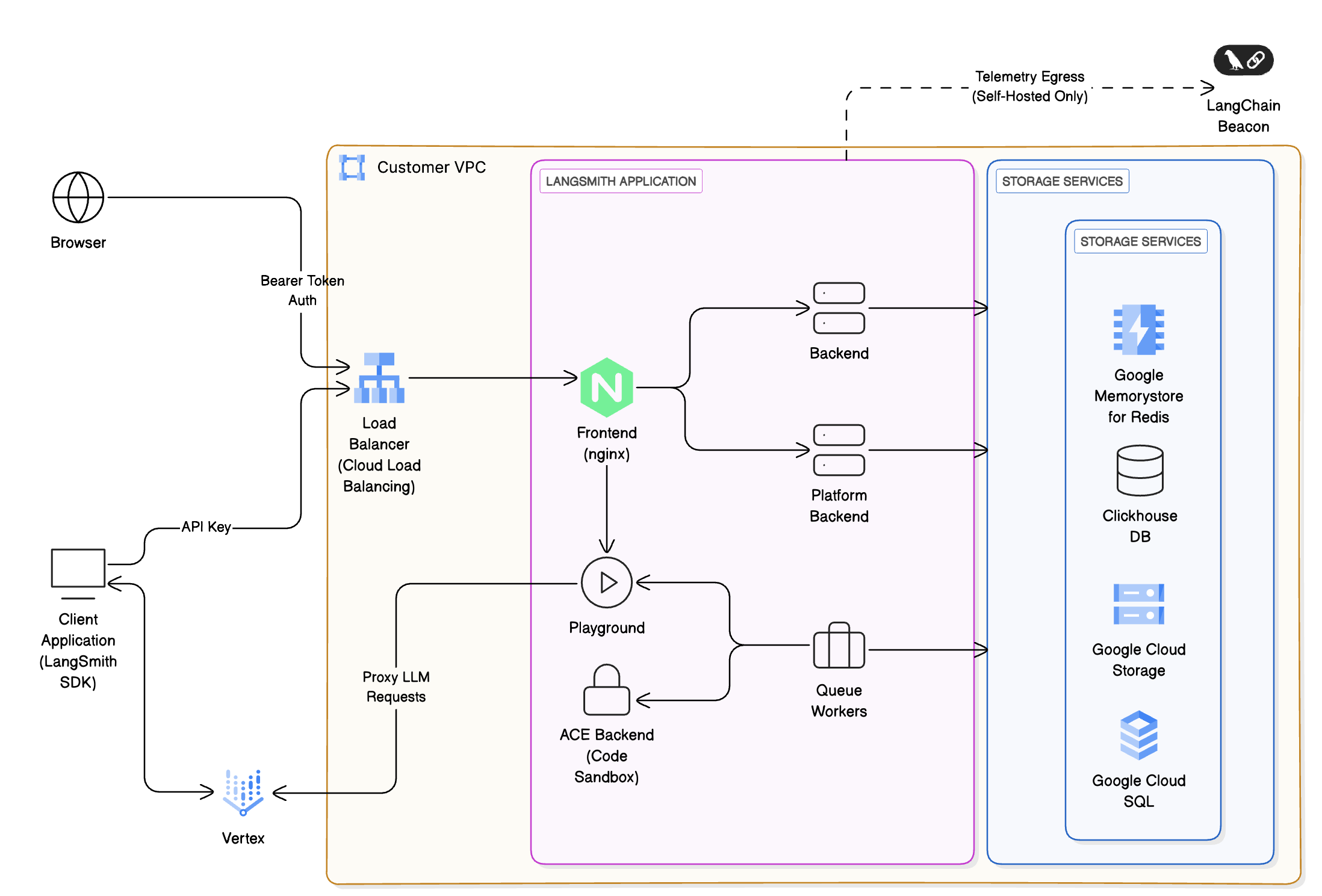 * **Ingress & networking**: Requests enter via [Cloud Load Balancing](https://cloud.google.com/load-balancing) within your [VPC](https://cloud.google.com/vpc), secured using [Cloud Armor](https://cloud.google.com/armor) and [IAM](https://cloud.google.com/iam)-based authentication.
* **Frontend & backend services:** Containers run on [Google Kubernetes Engine (GKE)](https://cloud.google.com/kubernetes-engine), orchestrated behind the load balancer. Routes requests to other services within the cluster as necessary.
* **Storage & databases:**
* [Cloud SQL for PostgreSQL](https://cloud.google.com/sql/docs/postgres): metadata, projects, users, and short-term and long-term memory for deployed agents. LangSmith supports PostgreSQL version 14 or higher.
* [Memorystore](https://cloud.google.com/memorystore) ([Redis](https://cloud.google.com/memorystore/docs/redis) or [Valkey](https://cloud.google.com/memorystore/docs/valkey)): caching and job queues. Memorystore can be in single-instance or cluster mode. LangSmith requires Redis OSS version 5 or higher, or Valkey 8.
* ClickHouse + [Persistent Disks](https://cloud.google.com/compute/docs/disks): analytics and trace storage.
* We recommend using an [externally managed ClickHouse solution](/langsmith/self-host-external-clickhouse) unless security or compliance reasons
prevent you from doing so.
* ClickHouse is not required for hybrid deployments.
* [Cloud Storage](https://cloud.google.com/storage): object storage for trace artifacts and telemetry.
* **LLM integration:** Optionally proxy requests to [Vertex AI](https://cloud.google.com/vertex-ai) for LLM inference.
* **Monitoring & observability:** Integrate with [Cloud Monitoring](https://cloud.google.com/monitoring) and [Cloud Logging](https://cloud.google.com/logging)
## Compute options
LangSmith supports multiple compute options depending on your requirements:
| Compute option | Description | Suitable for |
| ---------------------------------------- | ----------------------------------------- | ------------------------------------ |
| **Google Kubernetes Engine (preferred)** | Advanced scaling and multi-tenant support | Large enterprises |
| **Compute Engine-based** | Full control, BYO-infra | Regulated or air-gapped environments |
## Google cloud Well-Architected best practices
This reference is designed to align with the six pillars of the Google Cloud Well-Architected Framework:
### Operational excellence
* Automate deployments with IaC ([Terraform](https://www.terraform.io/) / [Deployment Manager](https://cloud.google.com/deployment-manager)).
* Use [Secret Manager](https://cloud.google.com/secret-manager) for configuration and sensitive data.
* Configure your LangSmith instance to [export telemetry data](/langsmith/export-backend) and continuously monitor via [Cloud Logging](https://cloud.google.com/logging).
* The preferred method to manage [LangSmith deployments](/langsmith/deployment) is to create a CI process that builds [Agent Server](/langsmith/agent-server) images and pushes them to [Artifact Registry](https://cloud.google.com/artifact-registry). Create a test deployment for pull requests before deploying a new revision to staging or production upon PR merge.
### Security
* Use [IAM](https://cloud.google.com/iam) roles with least-privilege policies and [Workload Identity](https://cloud.google.com/kubernetes-engine/docs/how-to/workload-identity) for secure pod-to-GCP-service authentication.
* Enable encryption at rest ([Cloud SQL](https://docs.cloud.google.com/sql/docs/postgres/cmek), [Cloud Storage](https://cloud.google.com/storage/docs/encryption), Persistent Disks) and in transit (TLS 1.2+).
* Integrate with [Secret Manager](https://cloud.google.com/secret-manager) for credentials.
* Use [Identity Platform](https://cloud.google.com/identity-platform) or [Workload Identity Federation](https://cloud.google.com/iam/docs/workload-identity-federation) as an IDP in conjunction with LangSmith's built-in authentication and authorization features to secure access to agents and their tools.
### Reliability
* Replicate the LangSmith [data plane](/langsmith/data-plane) across regions: Deploy identical data planes to Kubernetes clusters in different regions for LangSmith Deployment. Deploy [Cloud SQL](https://cloud.google.com/sql/docs/postgres/high-availability) and [GKE](https://docs.cloud.google.com/kubernetes-engine/docs/concepts/configuration-overview) services across multiple zones.
* Implement [autoscaling](https://cloud.google.com/kubernetes-engine/docs/concepts/cluster-autoscaler) for backend workers using [Horizontal Pod Autoscaler](https://cloud.google.com/kubernetes-engine/docs/concepts/horizontalpodautoscaler) and [Cluster Autoscaler](https://cloud.google.com/kubernetes-engine/docs/concepts/cluster-autoscaler).
* Use [Cloud DNS](https://cloud.google.com/dns) health checks and failover policies.
### Performance optimization
* Leverage [Compute Engine](https://cloud.google.com/compute) instances for optimized compute with [machine type selection](https://cloud.google.com/compute/docs/machine-types).
* Use [Cloud Storage lifecycle policies](https://cloud.google.com/storage/docs/lifecycle) for infrequently accessed trace data, moving to [Nearline](https://cloud.google.com/storage/docs/storage-classes#nearline) or [Coldline](https://cloud.google.com/storage/docs/storage-classes#coldline) storage classes.
### Cost optimization
* Right-size [GKE](https://cloud.google.com/kubernetes-engine) clusters using [Committed Use Discounts](https://cloud.google.com/compute/docs/instances/signing-up-committed-use-discounts) and [Sustained Use Discounts](https://cloud.google.com/compute/docs/sustained-use-discounts).
* Monitor cost KPIs using [Cloud Billing](https://cloud.google.com/billing/docs) dashboards and [Cost Management](https://cloud.google.com/cost-management) tools.
### Sustainability
* Minimize idle workloads with on-demand compute and [autoscaling](https://cloud.google.com/kubernetes-engine/docs/concepts/cluster-autoscaler).
* Store telemetry in low-latency, low-cost tiers using [Cloud Storage lifecycle policies](https://cloud.google.com/storage/docs/lifecycle).
* Enable auto-shutdown for non-prod environments using [scheduled actions](https://cloud.google.com/compute/docs/instances/schedule-instance-start-stop).
## Security and compliance
LangSmith can be configured for:
* [Private Service Connect](https://cloud.google.com/vpc/docs/private-service-connect)-only access (no public internet exposure, besides egress necessary for billing).
* [Cloud KMS](https://cloud.google.com/kms)-based encryption keys for Cloud Storage, Cloud SQL, and Persistent Disks.
* Audit logging to [Cloud Logging](https://cloud.google.com/logging) and [Cloud Audit Logs](https://cloud.google.com/logging/docs/audit).
Customers can deploy in [Assured Workloads](https://cloud.google.com/assured-workloads) regions for compliance with ISO, HIPAA, or other regulatory requirements as needed.
## Monitoring and evals
Use LangSmith to:
* Capture traces from LLM apps running on [Vertex AI](https://cloud.google.com/vertex-ai).
* Evaluate model outputs via [LangSmith datasets](/langsmith/manage-datasets).
* Track latency, token usage, and success rates.
Integrate with:
* [Cloud Monitoring](https://cloud.google.com/monitoring) dashboards.
* [OpenTelemetry](https://opentelemetry.io/) and [Prometheus](https://prometheus.io/) exporters.
***
* **Ingress & networking**: Requests enter via [Cloud Load Balancing](https://cloud.google.com/load-balancing) within your [VPC](https://cloud.google.com/vpc), secured using [Cloud Armor](https://cloud.google.com/armor) and [IAM](https://cloud.google.com/iam)-based authentication.
* **Frontend & backend services:** Containers run on [Google Kubernetes Engine (GKE)](https://cloud.google.com/kubernetes-engine), orchestrated behind the load balancer. Routes requests to other services within the cluster as necessary.
* **Storage & databases:**
* [Cloud SQL for PostgreSQL](https://cloud.google.com/sql/docs/postgres): metadata, projects, users, and short-term and long-term memory for deployed agents. LangSmith supports PostgreSQL version 14 or higher.
* [Memorystore](https://cloud.google.com/memorystore) ([Redis](https://cloud.google.com/memorystore/docs/redis) or [Valkey](https://cloud.google.com/memorystore/docs/valkey)): caching and job queues. Memorystore can be in single-instance or cluster mode. LangSmith requires Redis OSS version 5 or higher, or Valkey 8.
* ClickHouse + [Persistent Disks](https://cloud.google.com/compute/docs/disks): analytics and trace storage.
* We recommend using an [externally managed ClickHouse solution](/langsmith/self-host-external-clickhouse) unless security or compliance reasons
prevent you from doing so.
* ClickHouse is not required for hybrid deployments.
* [Cloud Storage](https://cloud.google.com/storage): object storage for trace artifacts and telemetry.
* **LLM integration:** Optionally proxy requests to [Vertex AI](https://cloud.google.com/vertex-ai) for LLM inference.
* **Monitoring & observability:** Integrate with [Cloud Monitoring](https://cloud.google.com/monitoring) and [Cloud Logging](https://cloud.google.com/logging)
## Compute options
LangSmith supports multiple compute options depending on your requirements:
| Compute option | Description | Suitable for |
| ---------------------------------------- | ----------------------------------------- | ------------------------------------ |
| **Google Kubernetes Engine (preferred)** | Advanced scaling and multi-tenant support | Large enterprises |
| **Compute Engine-based** | Full control, BYO-infra | Regulated or air-gapped environments |
## Google cloud Well-Architected best practices
This reference is designed to align with the six pillars of the Google Cloud Well-Architected Framework:
### Operational excellence
* Automate deployments with IaC ([Terraform](https://www.terraform.io/) / [Deployment Manager](https://cloud.google.com/deployment-manager)).
* Use [Secret Manager](https://cloud.google.com/secret-manager) for configuration and sensitive data.
* Configure your LangSmith instance to [export telemetry data](/langsmith/export-backend) and continuously monitor via [Cloud Logging](https://cloud.google.com/logging).
* The preferred method to manage [LangSmith deployments](/langsmith/deployment) is to create a CI process that builds [Agent Server](/langsmith/agent-server) images and pushes them to [Artifact Registry](https://cloud.google.com/artifact-registry). Create a test deployment for pull requests before deploying a new revision to staging or production upon PR merge.
### Security
* Use [IAM](https://cloud.google.com/iam) roles with least-privilege policies and [Workload Identity](https://cloud.google.com/kubernetes-engine/docs/how-to/workload-identity) for secure pod-to-GCP-service authentication.
* Enable encryption at rest ([Cloud SQL](https://docs.cloud.google.com/sql/docs/postgres/cmek), [Cloud Storage](https://cloud.google.com/storage/docs/encryption), Persistent Disks) and in transit (TLS 1.2+).
* Integrate with [Secret Manager](https://cloud.google.com/secret-manager) for credentials.
* Use [Identity Platform](https://cloud.google.com/identity-platform) or [Workload Identity Federation](https://cloud.google.com/iam/docs/workload-identity-federation) as an IDP in conjunction with LangSmith's built-in authentication and authorization features to secure access to agents and their tools.
### Reliability
* Replicate the LangSmith [data plane](/langsmith/data-plane) across regions: Deploy identical data planes to Kubernetes clusters in different regions for LangSmith Deployment. Deploy [Cloud SQL](https://cloud.google.com/sql/docs/postgres/high-availability) and [GKE](https://docs.cloud.google.com/kubernetes-engine/docs/concepts/configuration-overview) services across multiple zones.
* Implement [autoscaling](https://cloud.google.com/kubernetes-engine/docs/concepts/cluster-autoscaler) for backend workers using [Horizontal Pod Autoscaler](https://cloud.google.com/kubernetes-engine/docs/concepts/horizontalpodautoscaler) and [Cluster Autoscaler](https://cloud.google.com/kubernetes-engine/docs/concepts/cluster-autoscaler).
* Use [Cloud DNS](https://cloud.google.com/dns) health checks and failover policies.
### Performance optimization
* Leverage [Compute Engine](https://cloud.google.com/compute) instances for optimized compute with [machine type selection](https://cloud.google.com/compute/docs/machine-types).
* Use [Cloud Storage lifecycle policies](https://cloud.google.com/storage/docs/lifecycle) for infrequently accessed trace data, moving to [Nearline](https://cloud.google.com/storage/docs/storage-classes#nearline) or [Coldline](https://cloud.google.com/storage/docs/storage-classes#coldline) storage classes.
### Cost optimization
* Right-size [GKE](https://cloud.google.com/kubernetes-engine) clusters using [Committed Use Discounts](https://cloud.google.com/compute/docs/instances/signing-up-committed-use-discounts) and [Sustained Use Discounts](https://cloud.google.com/compute/docs/sustained-use-discounts).
* Monitor cost KPIs using [Cloud Billing](https://cloud.google.com/billing/docs) dashboards and [Cost Management](https://cloud.google.com/cost-management) tools.
### Sustainability
* Minimize idle workloads with on-demand compute and [autoscaling](https://cloud.google.com/kubernetes-engine/docs/concepts/cluster-autoscaler).
* Store telemetry in low-latency, low-cost tiers using [Cloud Storage lifecycle policies](https://cloud.google.com/storage/docs/lifecycle).
* Enable auto-shutdown for non-prod environments using [scheduled actions](https://cloud.google.com/compute/docs/instances/schedule-instance-start-stop).
## Security and compliance
LangSmith can be configured for:
* [Private Service Connect](https://cloud.google.com/vpc/docs/private-service-connect)-only access (no public internet exposure, besides egress necessary for billing).
* [Cloud KMS](https://cloud.google.com/kms)-based encryption keys for Cloud Storage, Cloud SQL, and Persistent Disks.
* Audit logging to [Cloud Logging](https://cloud.google.com/logging) and [Cloud Audit Logs](https://cloud.google.com/logging/docs/audit).
Customers can deploy in [Assured Workloads](https://cloud.google.com/assured-workloads) regions for compliance with ISO, HIPAA, or other regulatory requirements as needed.
## Monitoring and evals
Use LangSmith to:
* Capture traces from LLM apps running on [Vertex AI](https://cloud.google.com/vertex-ai).
* Evaluate model outputs via [LangSmith datasets](/langsmith/manage-datasets).
* Track latency, token usage, and success rates.
Integrate with:
* [Cloud Monitoring](https://cloud.google.com/monitoring) dashboards.
* [OpenTelemetry](https://opentelemetry.io/) and [Prometheus](https://prometheus.io/) exporters.
***
[Connect these docs](/use-these-docs) to Claude, VSCode, and more via MCP for real-time answers.
[Edit this page on GitHub](https://github.com/langchain-ai/docs/edit/main/src/langsmith/gcp-self-hosted.mdx) or [file an issue](https://github.com/langchain-ai/docs/issues/new/choose).